Yes, There's an App That Counts Calories From a Picture — Here's How It Works
Yes — an app that counts calories from a picture really exists: AI identifies each food on your plate, estimates portions and logs calories and macros in seconds. Here's how it works, how accurate it actually is, and how to get the most reliable numbers from it.
Short answer: yes — here's how counting calories from a picture works
Yes, there is an app that counts calories from a picture — several, in fact, and Foodify is one of them. You point your camera at your plate, the app identifies what's on it, estimates how much of each food is there, and returns calories and macros you can log in seconds. No database searching, no weighing every ingredient.
Under the hood, every photo calorie counter runs the same three-step pipeline:
- Food recognition. A computer-vision model identifies each item in the frame — grilled chicken, rice, broccoli — much the way your photo library recognizes faces and objects.
- Portion estimation. The app estimates how much of each food you have, using visual cues like plate size, food height and how much of the plate each item covers.
- Nutrition lookup. Each identified food and portion is matched against nutrition data to calculate calories, protein, carbs and fat.
Step two is the hard part, which is why any good photo calorie app lets you review and edit the portion before saving. General-purpose chatbots can also eyeball a food photo, but they aren't built for portion measurement or meal logging — we break that down in our guide to asking ChatGPT for calories from a photo.
How accurate is an app that counts calories from a picture?
Honest answer: good enough to be genuinely useful, but not lab-grade. Independent evaluations of photo-based food recognition tend to find the same pattern — identifying what the food is works well for common dishes, while estimating how much is the weak link. Total calorie error typically lands somewhere in the range of roughly 10–30%.
Where you fall in that range depends heavily on the meal:
- Single, recognizable foods — an apple, a grilled chicken breast, a slice of pizza — tend to sit at the accurate end, often within about 10–15%.
- Mixed meals — curries, stews, pasta in sauce, anything layered in a deep bowl — are harder, because the camera can't see what's underneath or how much oil went into the pan. Errors of 25% or more are common here.
Before that puts you off, some context: research on self-reported food diaries consistently finds that people underestimate what they eat, often substantially. A photo scan you actually do at every meal usually beats a manual log you abandon in week two. We go deeper into the evidence in our AI calorie counter accuracy guide.
Key takeaway: the biggest source of error in photo calorie counting is portion size, not food identification. Take five seconds to sanity-check the estimated grams before you save, and you close most of the gap.
Counting calories from a photo with Foodify
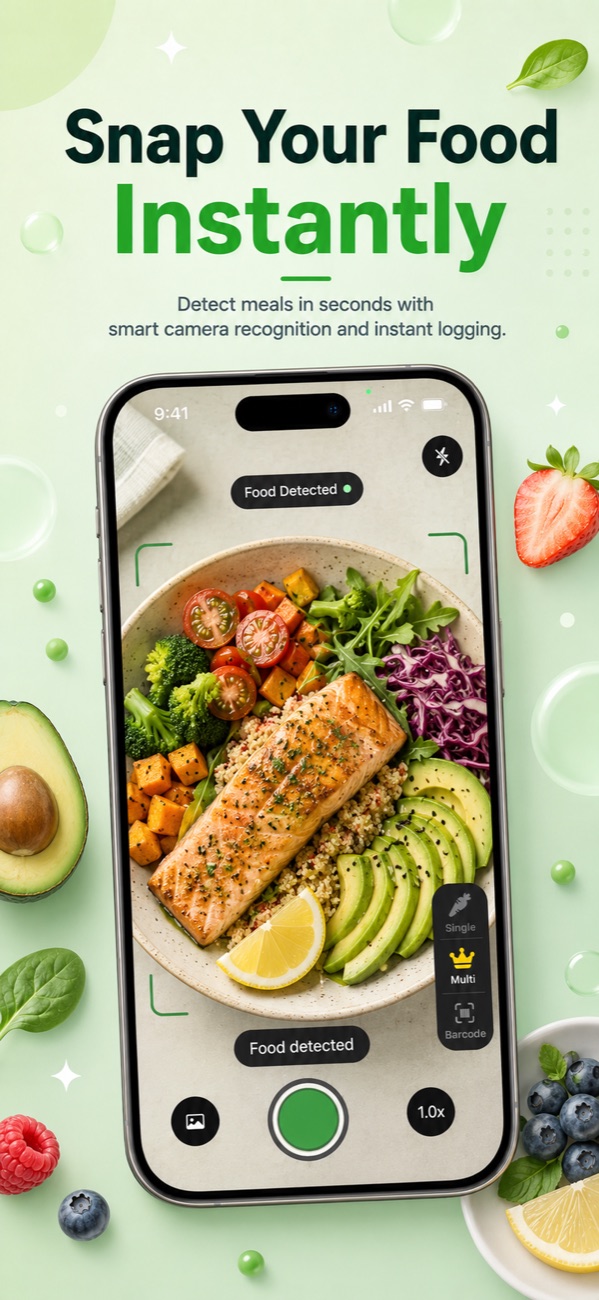
Here's what the flow looks like in Foodify, our AI calorie counter for iPhone. Open the camera, frame your plate, and the app detects multiple foods in one shot — chicken, rice and salad each get their own line, each with its own portion estimate. That multi-food detection matters, because real plates rarely hold one food at a time.
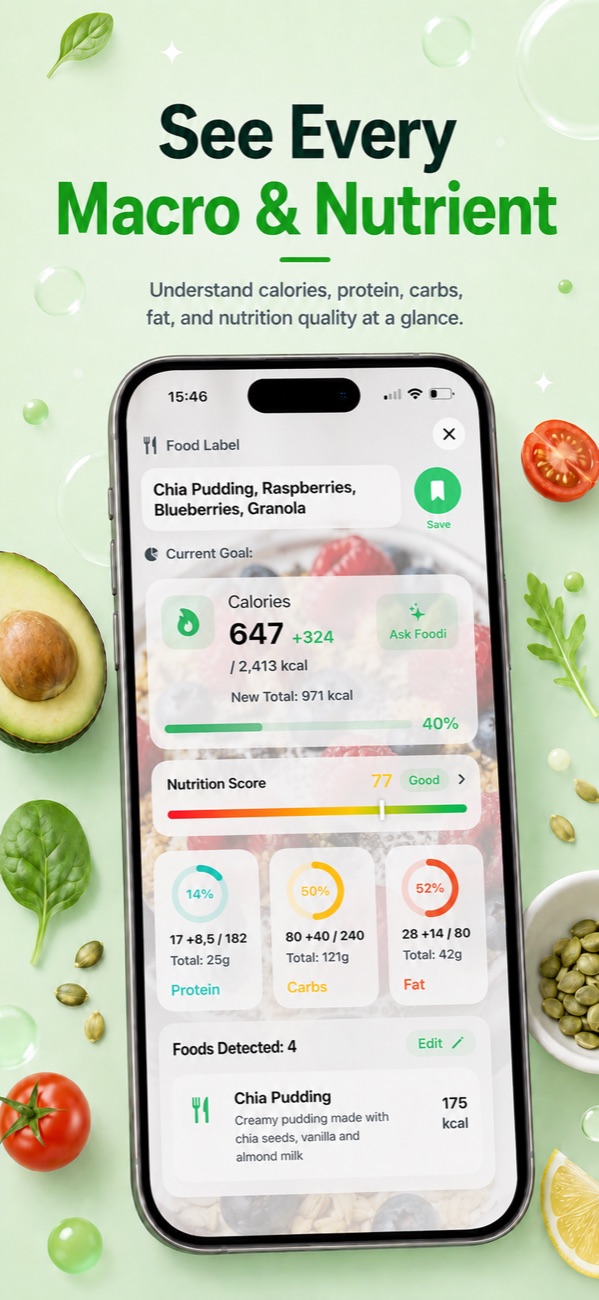
Every number is editable before you save. If Foodify guesses 200 g of rice and you know it's closer to 150 g, tap and adjust — calories and macros update instantly. Once saved, the meal counts toward your personalized calorie and protein, carb and fat targets, and it gets a Nutrition Score from 0 to 100 so you can see meal quality at a glance, not just quantity.
Foodify is free to download, with daily limits on AI features on the free tier. A barcode scanner, saved meals library, water and weight tracking, and Apple Health sync sit alongside the camera, so photo logging is one tool in the kit rather than the whole app.
Photos vs barcodes vs manual search: when to use each
A photo isn't always the best tool for the job. A well-built app that counts calories from a picture should also offer a barcode scanner and manual entry, because each method wins in a different situation:
| Method | Best for | Speed | Watch out for |
|---|---|---|---|
| Photo scan | Plated meals, restaurant food, multi-item plates | Seconds per meal | Portion estimates need a quick sanity check; hidden oils and sauces |
| Barcode scan | Packaged foods and drinks | Seconds per item | Label data is per serving — check how many servings you actually ate |
| Manual search | Recipe ingredients, foods you've weighed, anything with no clear visual | Slowest | Database duplicates and bad entries; easy to skip on busy days |
Rule of thumb: barcode for anything with a label, photo for anything on a plate, manual for recipes you build once and reuse from your saved meals.
Tips for more accurate food photos
A few small habits noticeably improve what any photo calorie counter can do:
- Shoot at a slight angle. Around 45° lets the app see both the spread of the food and its height — straight-on side shots hide half the plate.
- Keep a size reference in frame. A fork, your hand or a standard dinner plate gives the model a sense of scale.
- Use decent lighting and capture the whole plate. Dim or cropped photos hide information the app needs.
- Photograph before you mix. Rice next to curry is far easier to estimate than rice under curry.
- Edit portions when you know better. You often have information the camera doesn't — that it's a double serving, or cooked in butter. Adjust before saving.
- Spot-check calorie-dense foods. Occasionally weighing oil, nuts, cheese or nut butter teaches your eye what portions really look like — more on that in our guide to counting calories without weighing food.
FAQ
Does photo calorie counting work for restaurant food?
Yes — plated restaurant meals are one of the best use cases, since there's no label and no recipe to look up. The weak spot is hidden fat: restaurants generally cook with more oil and butter than home kitchens, so photo estimates for fried or creamy dishes tend to run low. Round those up, and see our guide to tracking calories when eating out for more.
Can an app count calories in homemade meals from a photo?
Yes — plated home cooking works much like restaurant food. Casseroles, soups and stews are the exception, because a photo can't reveal your recipe. For dishes you make often, log the ingredients once, save the meal, and reuse it; Foodify's saved meals library exists for exactly that.
Should I photograph packaged snacks or scan the barcode?
Barcode. A photo can identify a granola bar, but the barcode pulls exact label data, which will always beat a visual estimate. Save the camera for food without packaging.
Is there a free app that counts calories from a picture?
Foodify is free to download on iPhone (iOS 17.6 or later), and the free tier includes AI photo scans with daily limits. Foodify Pro unlocks extended AI scans, personalized meal plans and the Foodi AI coach, with a 3-day free trial — plans run $5.99/week, $12.99/month or $49.99/year (about $4.17/month).

Log your next meal with one photo
Download Foodify free on iPhone, point the camera at your plate and get calories, macros and a Nutrition Score in seconds.

Free to download · AI photo food scanning · iPhone