How to Count Calories in Homemade Food: Recipe Math vs a Photo
Wondering how to count calories in homemade food? There are two honest ways: add up every ingredient in the recipe, or estimate the finished plate with a photo — and knowing when to use each one is the whole game.
The two ways to count calories in homemade food
There are really only two ways to count calories in homemade food: add up every ingredient in the recipe and divide by portions, or estimate the finished plate directly — by eye or with an AI photo scan. Recipe math is more precise and worth the effort for meals you cook on repeat. The photo method is the fallback for everything else: one-off dinners, food someone else made, and any plate where you'll never see the ingredient list.
Here's how to do both properly, including the trap that quietly ruins most people's recipe math — cooked versus raw weight.
Method 1: ingredient-by-ingredient recipe math
This is the gold standard for how to count calories in homemade food, and it's less painful than it sounds once you've done it twice.
- Weigh every ingredient raw, as it goes into the pot. That includes the invisible stuff: a tablespoon of olive oil is about 120 calories, and most home cooks pour two or three without noticing.
- Look up each ingredient's calories using a per-100g database entry or the package label, and match the entry to the raw weight you measured.
- Add everything up. That's the calorie total for the entire recipe — cooking won't meaningfully change it, no matter how long the pot simmers.
- Weigh the finished dish. Put the whole pot on the scale and subtract the pot's empty weight.
- Divide total calories by cooked weight to get calories per gram. Now weigh your actual serving and multiply. A 2,000-calorie chili that cooks down to 1,600 g is 1.25 cal/g — so a 400 g bowl is 500 calories, every time.
The cooked-vs-raw weight trap
Cooking barely changes calories, but it dramatically changes weight. Rice soaks up water and roughly triples in weight, pasta more than doubles, and meat does the opposite — it can lose a quarter of its weight in the pan. So "100 g of chicken breast" is a very different number depending on whether you mean raw or cooked — and databases list both, often without making it obvious. The rule: match the database entry to the moment you weighed the food. The whole-pot method above sidesteps the problem entirely, because you lock in calories from raw weights and then only ever divide by the cooked total.
Method 2: snap a photo of the finished plate
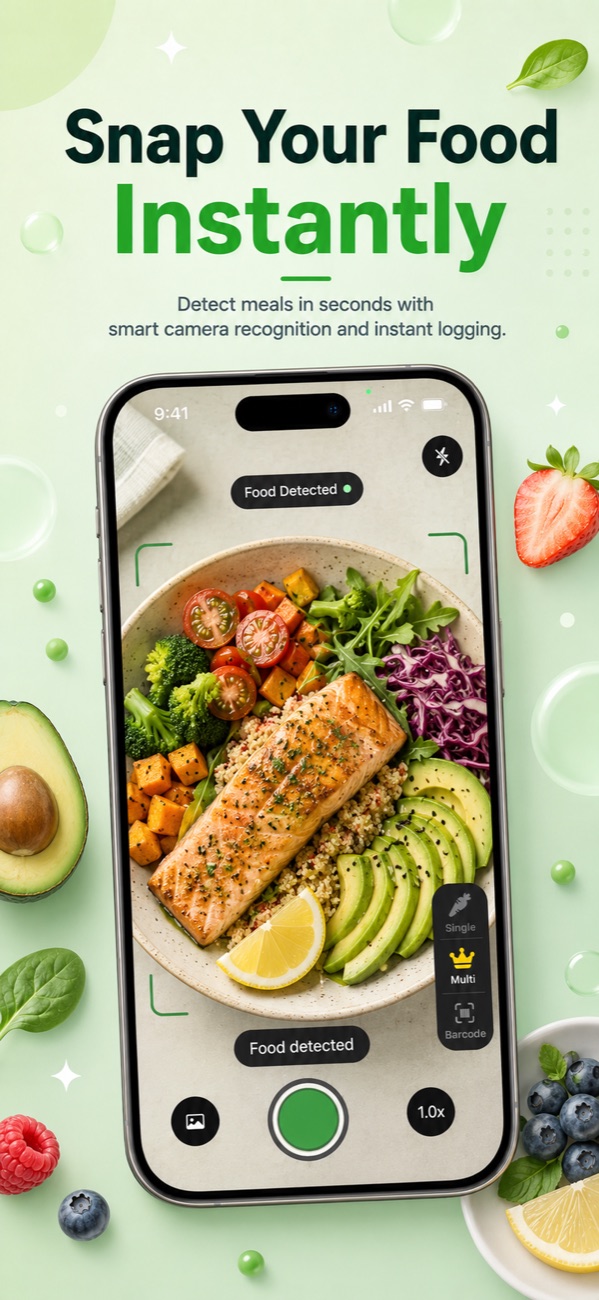
Recipe math has one requirement you can't always meet: knowing what went in. If you didn't cook the meal — or you cooked it with untracked splashes of oil and "some" cheese — the honest alternative is estimating the finished plate, and AI photo scanning has made that far faster than menu-guessing. You take a picture, the app identifies the foods on the plate, estimates portion sizes, and returns a calorie and macro breakdown you can adjust.
Be realistic about precision. Independent evaluations of photo-based food recognition generally find estimates land in the right ballpark — often within roughly 20–30 percent — for visually distinct foods, with bigger misses on mixed and layered dishes. That's less exact than a food scale, but for a meal you'd otherwise log as a wild guess (or not at all), it's a genuine upgrade. We cover how the technology works in our guide to calorie counting apps that work from a picture.
When someone else cooked: family dinners, potlucks and meal trains
You can't ask grandma for gram weights, and you shouldn't bring a food scale to a potluck. For these meals, use a three-part approach:
- Photo-scan or eyeball the plate the same way you'd handle a restaurant meal — the tactics in our guide to tracking calories when eating out apply almost unchanged to someone else's kitchen.
- Ask one casual question. "Is there butter in this?" or "cream or milk?" changes an estimate more than anything else, and nobody finds it weird.
- Round up on fat, not volume. Home cooks under-report oil and butter even to themselves. Assume a generous hand unless you watched them cook.
And keep perspective: one imperfectly logged family dinner has almost no effect on a week's total. Log a reasonable number and move on — consistency beats precision.
Logging a homemade plate with Foodify
Foodify is an iPhone app built around exactly this problem. Point the camera at your plate and its AI scan detects multiple foods at once — the chicken, the rice, the roasted vegetables — and estimates a portion for each. Every result is editable before you save it, which matters most for homemade food: if the scan reads your casserole as 250 g and you know you served yourself closer to 400 g, you change the number and the calories update.
Foodify is free to download, with daily limits on the AI features. Upgrading to Pro extends the AI scans and unlocks the Foodi AI coach — a chat where you can send a photo or describe a murky dish ("lentil curry made with coconut milk, about two cups") and ask follow-up questions — along with personalized meal plans and weekly insights, with a 3-day free trial.
The dishes everyone struggles with — soups, curries and hidden butter
Some homemade dishes are hard for AI, hard for databases, and hard for trained dietitians, all for the same reasons: the ingredients are dissolved, submerged or invisible.
- Soups and stews: the liquid hides what's in them, and a "bowl" can vary by 300 g. Fix: use the whole-pot method once for your own recipes, and for anyone else's, log a comparable database entry and adjust the portion honestly.
- Curries and cream sauces: the calorie driver is the fat in the sauce — coconut milk, cream, ghee — not the visible protein. When in doubt, assume the richer version.
- Hidden butter: mashed potatoes, "sautéed" vegetables and finished steaks often carry a silent 100–200 calories of butter. If it tastes glossy and delicious, it probably does.
For any dish in this category, treat the first log as a draft: pick your best estimate, then refine it the next time you make or eat the dish. If you want more scale-free estimating tactics, see our guide to counting calories without weighing food.
Batch cooking: log the recipe once, reuse the portion
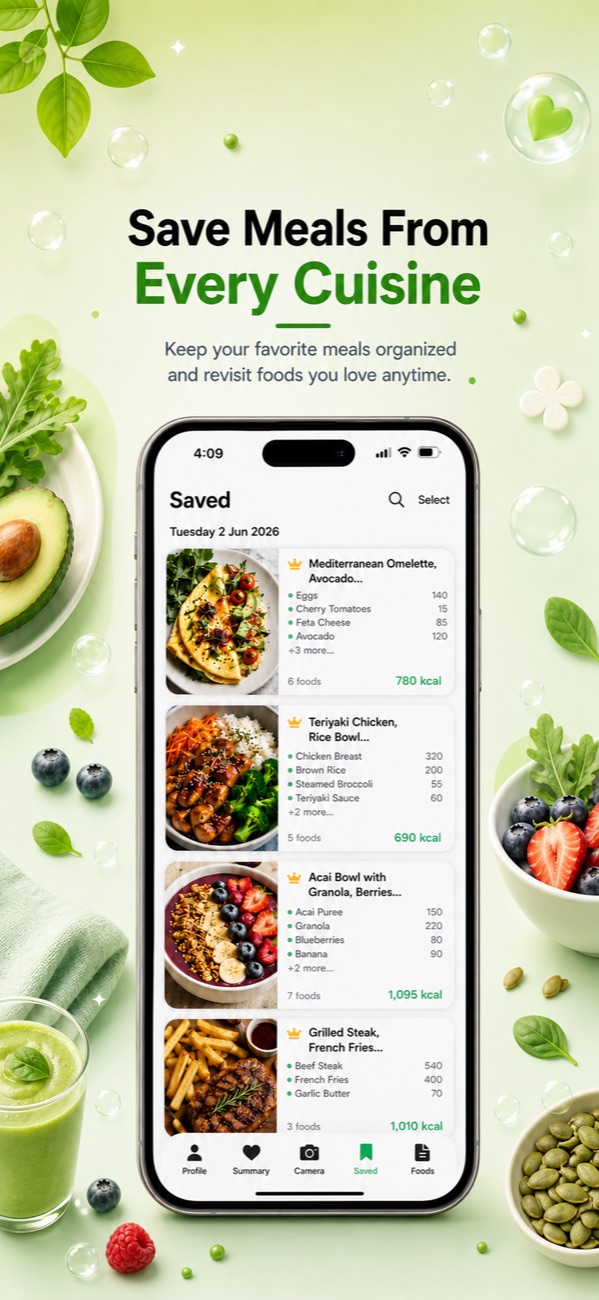
Here's where the two methods combine into the laziest accurate system available. For anything you batch-cook — chili, curry, soup, lasagna — do the full recipe math exactly once, then save the result. Every future serving is just a portion of a known dish: no lookups, no re-scanning, no guessing.
In Foodify, that lives in the saved meals library. Log the dish once with its calories, save it, and next Tuesday's leftover bowl takes seconds to re-log — and you can still adjust the portion if tonight's serving is bigger.
FAQ
Should I weigh food raw or cooked when counting calories?
Either works — the trap is mixing them. If you weigh raw, use a raw database entry; if you weigh cooked, use a cooked entry. For whole recipes, the cleanest approach is to weigh ingredients raw, total the calories, then divide by the cooked weight of the finished dish to get calories per gram.
Do calories change when food is cooked?
Not meaningfully. Cooking changes water content — which changes weight — but the calories stay in the food (plus whatever fat you added to the pan). Cooked digestibility differences exist but are too small to matter for everyday tracking.
How do I count calories in a meal someone else cooked?
Estimate the finished plate: photo-scan it or match it to a similar database entry, ask what fat it was cooked in if you can, and round the fat estimate up rather than down. One estimated meal barely moves a weekly total, so don't let precision anxiety stop you from logging anything at all.
How accurate is counting calories in homemade food?
Full recipe math with a food scale is about as accurate as calorie counting gets — typically tighter than the labels on packaged food. Photo and eyeball estimates are rougher, commonly off by 20–30 percent on mixed dishes, which is still accurate enough to keep a weekly average on track.
Log tonight's dinner with one photo
Foodify's AI scan breaks a home-cooked plate into foods and portions you can edit before saving — free to download on iPhone.

Free to download · AI photo food scanning · iPhone